When one of your customers has made a purchase. It needs to be approved and paid for on the Mayzing Seller Dashboard, before it is sent to our printers network to be fulfilled. The default preference is Manual approval. If you would like to change this, please follow the below steps.
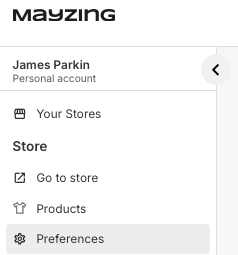
Go to your store dashboard https://dashboard.mayzing.com, and click preferences
Scroll down to the Order Approval section
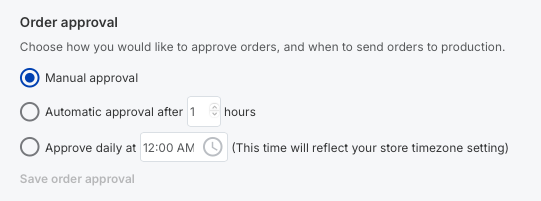
You can choose to;
Leave it as Manual Approval. This will require you to come in to the Mayzing dashboard each time you have a sale, to push the order through
Automatically approve after X hours. This will wait until the time you have set has elapsed, and automatically approve the order and charge the card you set in Payment Preferences.
Approve daily at XX:XX. This will automatically push through all orders you have received at a specific time you specify. This will then automatically charge the card you set in steps Payment Preferences
Once you have selected the option you want, Save order approval will be highlighted in blue. Click this to save.
All future orders will use now this order approval option.
If you wish to change this preference in the future, follow the same steps.
