Go to your store dashboard https://dashboard.mayzing.com and click on Settings > Payment Methods.
If you have not added a payment method previously, this page will only show the option to add a payment.
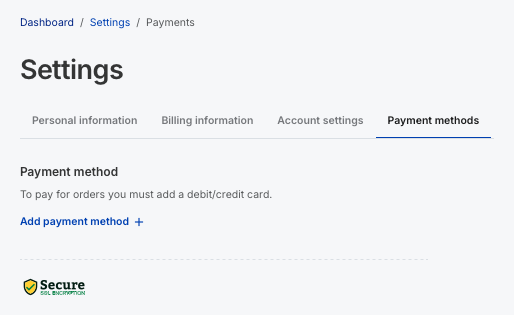
Press Add Payment Method
Fill in your card details, and registered address.
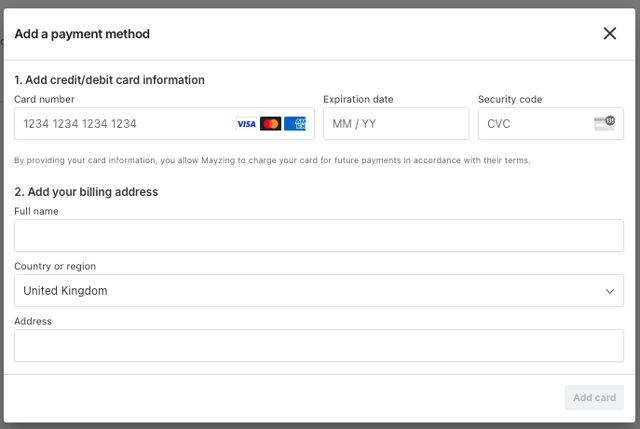
Once you have filled in all of the fields, press Add Card
You will be returned to the previous screen, but you will now see a card has been registered.
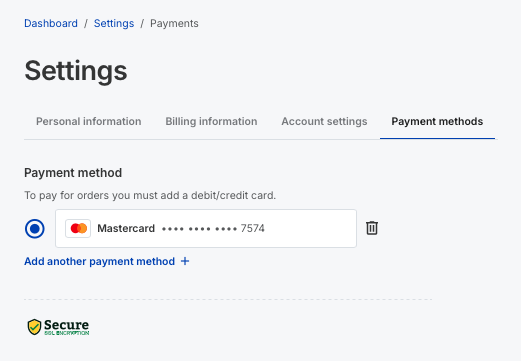
If you want to add another payment method, press the Add another payment method button.
If you wish to change the card you have registered, click Remove Card.
You will get a pop-up message asking you to confirm that you wish to remove the card.
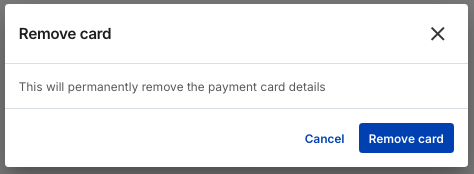
Click the remove card button to proceed, or the cancel button to back out.
You will be returned to the screen showing you have no valid payment methods in place.
Return to step 3 to put in the new card details.
