Here’s a guide to common pitfalls and how to create artwork that translates seamlessly from your screen to the final product.
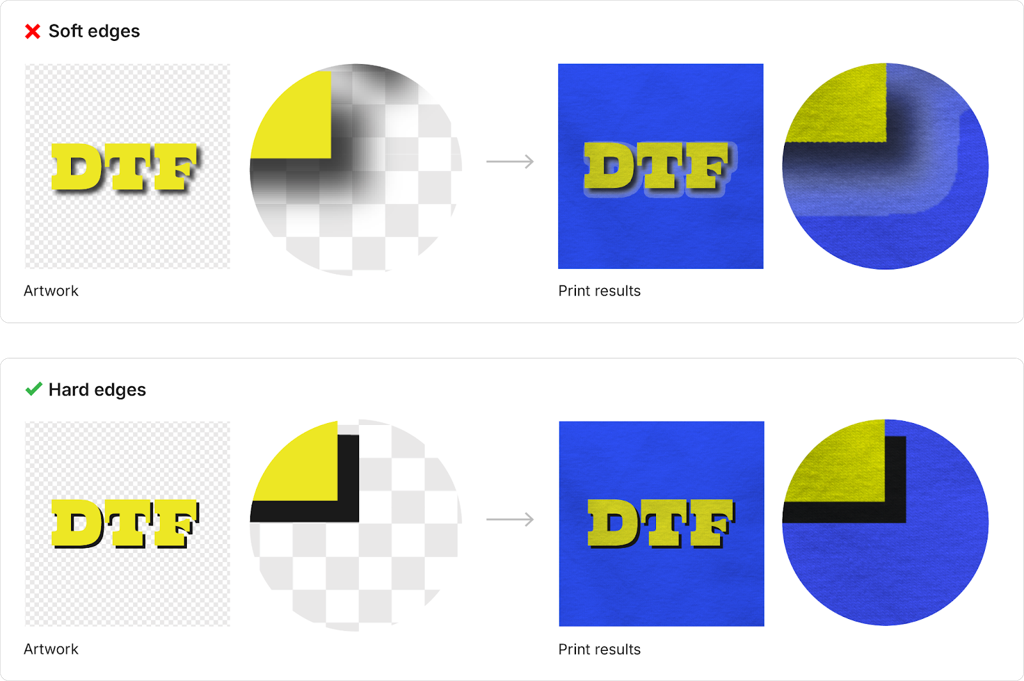
The Issue: Effects like drop shadows or feathered gradients often fade to transparency. While these look great on screen, DTF printing applies a solid white ink base beneath your design, creating unwanted white halos or outlines.
Solution: Avoid transparency. Replace fading shadows or gradients with solid colors or transitions into another color instead of transparency.
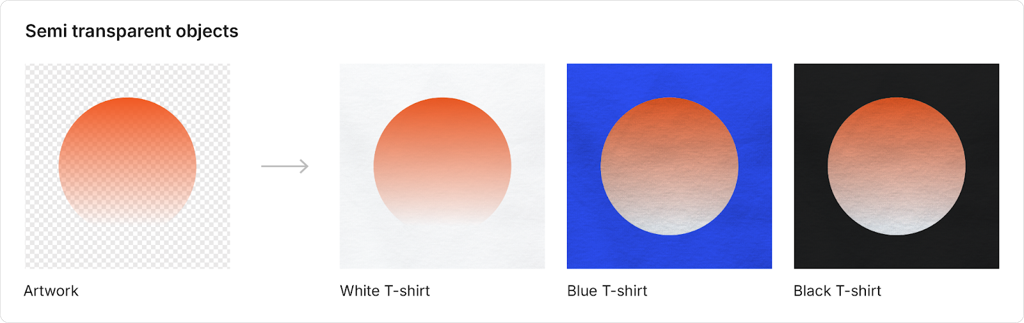
The Issue: Layers or objects with less than 100% opacity may print unevenly or allow the white base to show through, disrupting the intended look.
Solution: Ensure all layers in your design are fully opaque.
Use solid and defined shapes
Avoid fading edges, semi-transparent areas, or overly intricate patterns. Stick to bold, clearly defined elements.
Design in high resolution
Work in 300 DPI or vector format to ensure sharp, clean lines and vibrant details.
Choose bold colors and high contrast
For designs on dark or patterned fabrics, use vibrant colors and clear contrasts to ensure your artwork pops.
Check line widths
All lines and strokes must be at least 8px wide for correct printing.
Check your backgrounds
Transparent backgrounds are ideal for most designs, but ensure your design edges are fully opaque.
Test and preview
Double-check your design for any transparency issues or fine details that might not print well.
By following these guidelines, you’ll avoid common printing issues like white halos, blurry details, or invisible designs. This ensures:
Vibrant, professional-looking products.
Satisfied customers who love their printed items.
Fewer delays or rejections caused by incorrect artwork files.
Create with confidence, and let’s bring your designs to life—flawlessly!
